
Your agents run in parallel.
Your attention doesn't.
Every Claude Code session in your menu bar — which one finished, which one is blocking on you, and one click back to its terminal.
macOS 13.0 or later · Apple Silicon & Intel · Signed & notarized by Apple · No connection you did not ask for
It reads process state and the status files the hooks write — not your transcripts.
Built to give you four things back.
SpectiX has one job: keep the cost of running AI agents from landing on you. Every feature is measured against these four promises.
Your time
No more patrolling terminals to find out who finished. One glance at the menu bar tells you whether anything needs you, and one click puts you there — cursor already in the input box.
Your attention
Working sessions stay silent. You are interrupted only when a session is actually blocking on you, most urgent first, and the alert clears itself the moment you look.
More out of every AI you run
Run five sessions with the same confidence as one. See what each is doing right now, how long it has been at it, and how much of its context and your subscription quota is left — so you feed the next task at the right moment instead of guessing.
Your health
Staring at a spinner is not work. When nothing needs you, SpectiX stays out of the way — get up, stretch, look away from the screen. The session that needs you will come and find you.
Four things, done properly.
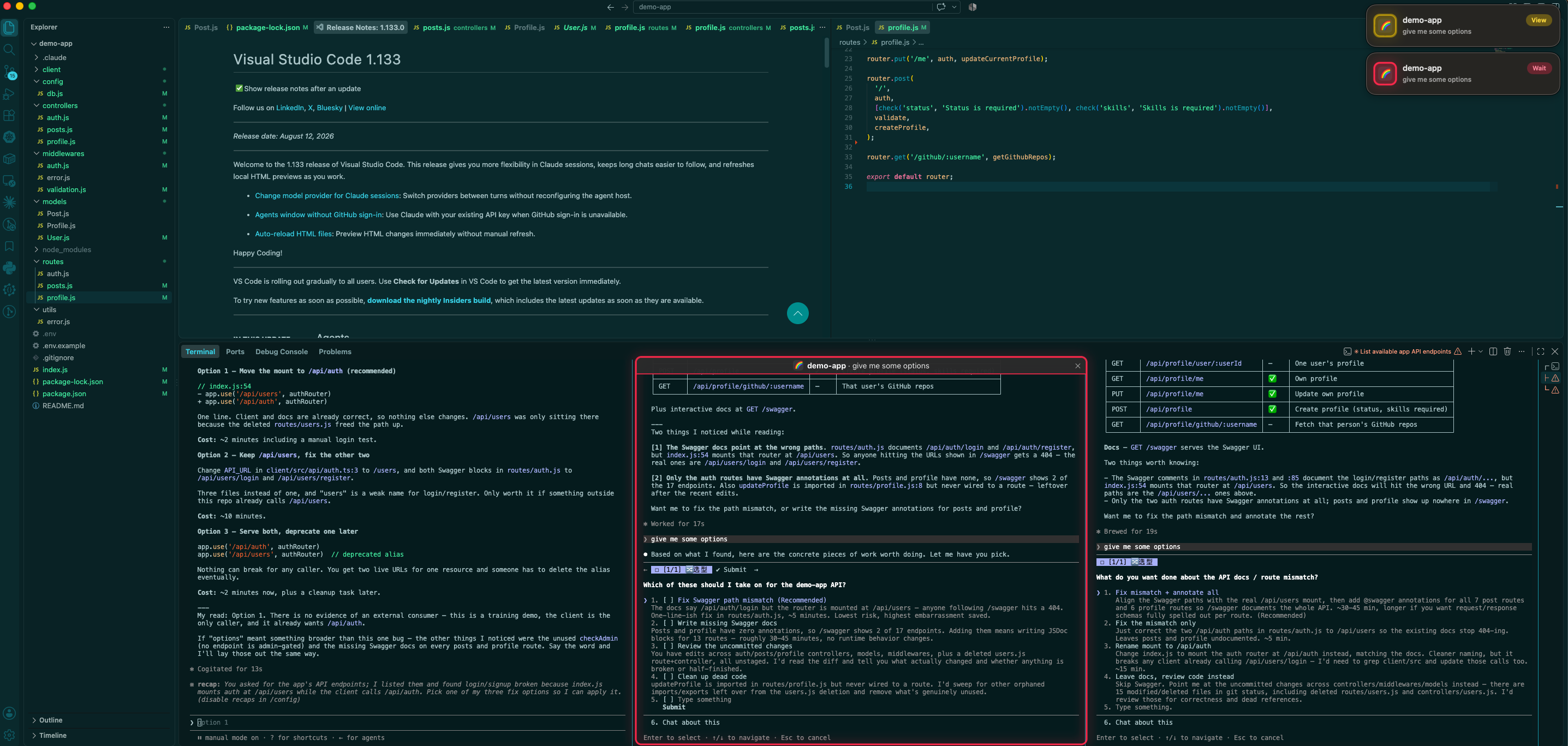
One click back to the exact terminal — even the third pane in the same VS Code window
Click a row and you land in that session's terminal with the cursor in its input box, and a breathing ring lights up the pane you landed on. Pane-level, not window-level. ⌃⌥⌘N walks you to the next session that needs you.
Status you can trust
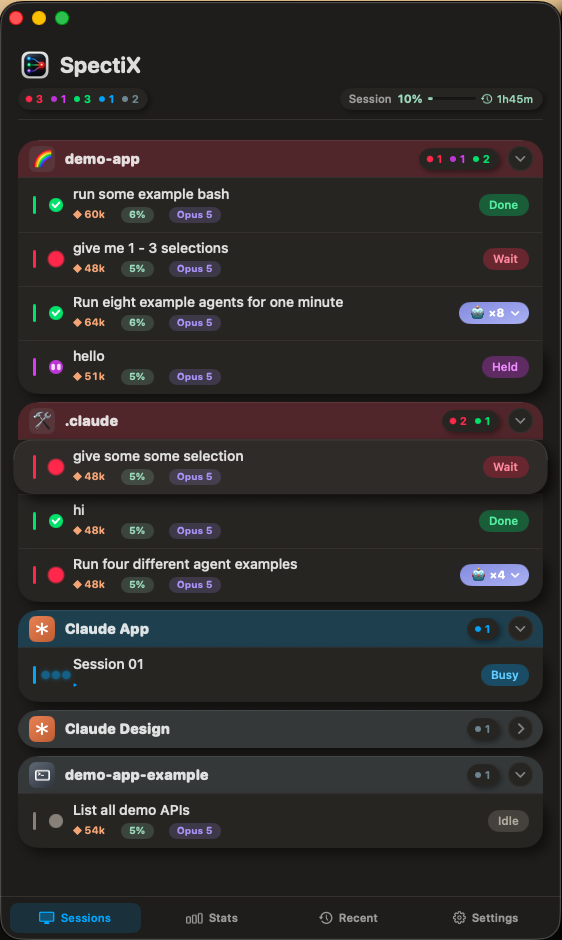
SpectiX does not decide a session's state from one signal. It fuses the Claude Code hook events, live inspection of the process tree, and the daemon's own session state. That is why it does not stay red after you click approve, and why it keys everything by tty — the one identifier that stays put for the life of a terminal.
Status and usage in one place
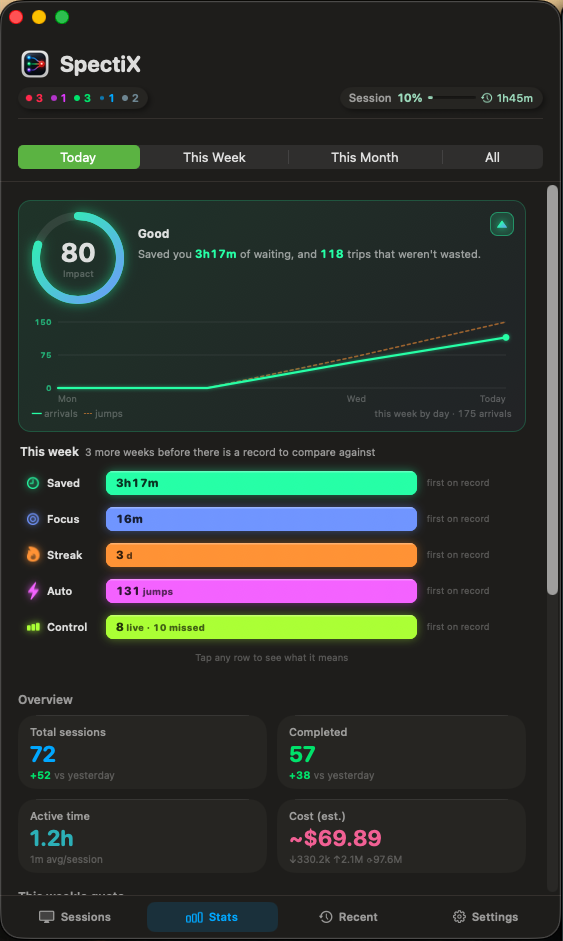
A working row shows the tool step it is on right now (▸ Edit · router.ts). A finished row shows elapsed time, tokens, the model that session is on, and how much of its context window is gone — so you know who is burning Opus on chores before you open anything.
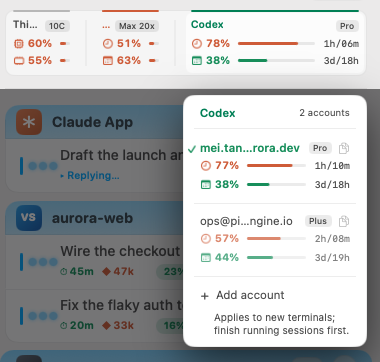
Two accounts, one CLI — switch without signing in again
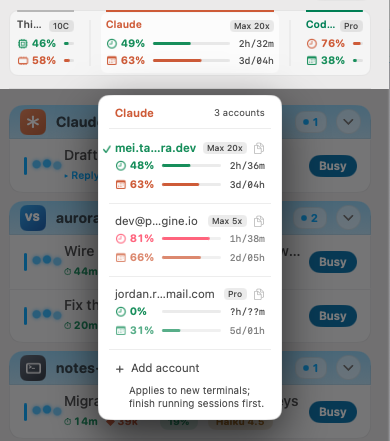
Claude Code and Codex each hold one sign-in at a time, so a second account otherwise means logging out and back in. Click the account card in the header and every address you have used is listed with its plan and how much of its five-hour and weekly limit is gone. Pick one and the next terminal you open is on it — sessions already running finish on the account they started.
Why does it need Accessibility access?
Because jumping you back to the right terminal means touching other apps. That is macOS's definition of an "accessibility" action, and macOS is right to gate it. Here is exactly what SpectiX does with the permission — and what it never does.
What it does with the permission
- Reads window and tab titles, so it can find the terminal that belongs to a session
- Raises that window and focuses the correct split pane when you click a row
- Draws the highlight ring on the pane it landed on
What it never does
- Read the contents of your terminal, your code, or your Claude transcripts
- Take screenshots or record your screen — Screen Recording is not requested at all
- Send your sessions, code or transcripts anywhere. Nothing goes out unless you press something that says it will — in the account panel, its refresh button and a click on another Claude account to switch to it each ask for that account's quota, and carry nothing else.
- Keep running in the background once you quit it
- It asked for one permission, and it isn't network. The entitlement
list lives inside the code signature — change one byte of the app and the
signature breaks and macOS won't launch it.
codesign -d --entitlements - /Applications/SpectiX.app → com.apple.security.automation.apple-events — that's the whole list → no network.client, no network.server, nothing else
- The binary has no network stack in it. An app can't make requests
without the machinery to make them, and it verifiably isn't there.
otool -L /Applications/SpectiX.app/Contents/MacOS/SpectiX → Cocoa, AppKit, Foundation, Carbon, CoreGraphics, Swift runtime → no CFNetwork, no Network.framework, no libcurl, no libssl
- Zero sockets while it runs. Not "a few harmless ones" — none, on
launch and after a week of uptime.
lsof -i -a -p $(pgrep -x SpectiX) → no output at allStronger versions of the same check: leave it behind Little Snitch or LuLu for a week — it will never once ask you to allow a connection, with two exceptions you have to press yourself, both in the account panel: its refresh button, and a click on another Claude account to switch to it — each starts curl to fetch that account's quota, and that is the connection a firewall will ask about. Or just turn off Wi-Fi and use it all day: every feature behaves identically, because none of them ever involved the network — the two presses that do use it fail quietly, and the row keeps its last figure.
- It's the copy we signed, and Apple scanned it. Signed with an Apple
Developer ID and notarized, so macOS can prove the app on your disk is
byte-for-byte the one that was signed
(
spctl -a -vvv /Applications/SpectiX.app→source=Notarized Developer ID).
Where it works
Two questions, two different answers: whether a session shows up at all, and whether clicking its row sends you back to it. The first works everywhere. The second needs a host SpectiX knows how to drive, so here is the list.
Seeing a session — any host
- Claude Code running in any terminal, editor, SSH session or tmux window appears in the list.
- Status accuracy does not depend on the host — everything is keyed by the session's controlling tty.
- One boundary, and it is ours: a host that never allocates a pty produces no row at all rather than a wrong one. The full write-up is here.
Click-to-jump and the ring — these hosts today
- Terminals: Terminal.app · iTerm2
- Editors: VS Code · Cursor · Windsurf — down to the right terminal pane inside a window, with the breathing ring on the pane you landed on
- Desktop app: Claude for Desktop, detected through Accessibility
Planned — hosts we intend to add jump support for
- Terminals: Ghostty · WezTerm · kitty · Alacritty · Warp · Hyper · Tabby
- Editors: Zed · JetBrains IDEs (IntelliJ IDEA, PyCharm, WebStorm, GoLand, RustRover…) · Xcode
- Session shapes: tmux panes and ssh sessions — landing on the pane itself rather than the window that happens to contain it
- No dates, and none of this is a commitment to a particular release. The order follows what people actually run, so telling us which host you use is what moves it up.
Claude Code today. Sessions belonging to Codex, Gemini CLI or Aider are not tracked yet — they are on the roadmap.
Install in 30 seconds
Download the installer
One file, one icon. Nothing to configure first.
Open it and click Install
It puts SpectiX in Applications, installs the status hooks into
~/.claude, and adds the companion editor extension if you have
VS Code, Cursor or Windsurf. Nothing else on your system is touched.
macOS asks you to confirm — once
That is the standard prompt every app downloaded from the web gets. Click Open. It does not come back.
Stop patrolling terminals. Let them tell you.
Free. Runs on macOS 13.0 and later, Apple Silicon and Intel, and never phones home.
Signed & notarized by Apple · No connection you did not ask for · Uninstalls cleanly (how)
Still being built.
New builds and fixes land on this page. Here is what is being worked on next — no dates attached, and the order follows what people actually run.
More terminals and editors
Ghostty, WezTerm, kitty, Zed, the JetBrains IDEs and Xcode — each with click-to-jump and the ring, down to the right pane. What already works is listed above.
Beyond Claude Code
Codex, Gemini CLI and Aider in the same panel — every agent you have running in one place, instead of one menu bar item per tool.
tmux and ssh, down to the pane
Those sessions already appear with full status accuracy. What is missing is landing on the pane itself rather than the window that happens to contain it.
Frequently asked
Why does SpectiX need Accessibility permission?
For two things only: reading window and tab titles so it can match a session to its terminal, and raising and focusing that window — including the correct split pane — when you click a row. It never reads terminal contents, your code, or your Claude transcripts, never takes screenshots, and opens no connection you did not ask for. It does not request Screen Recording at all.
Does it send my code or session data anywhere?
No. SpectiX runs entirely on your Mac and the binary opens no
connection at all. It reads local process state and the local status files under
~/.claude/spectix/.
You can verify that from outside the app: run it behind an outbound firewall such as Little Snitch and nothing will ever ask for permission — with two exceptions you have to press yourself, both in the account panel: its refresh button, and a click on another Claude account to switch to it. Each asks Anthropic's own usage endpoint for that account's quota, using that account's access token and sending nothing else. It happens on those presses and at no other moment: not when the panel opens, never on a timer.
It's closed source — why should I trust it?
You shouldn't have to. Publishing the code wouldn't actually settle this question either: what runs on your Mac is the binary, not the source, and nothing ties one to the other unless you compile it yourself.
So SpectiX is built to be audited from outside instead — against the exact copy
you downloaded. Its signed entitlement list contains one permission and no network
one (codesign -d --entitlements -). Its binary links no network stack at
all (otool -L). It opens no sockets while running
(lsof -i -a -p $(pgrep -x SpectiX) prints nothing). And Apple has
notarized this exact build (spctl -a -vvv). Four checks, none of which
rely on our word — the full walkthrough with expected output is on the
privacy page.
How does it know a session's status?
Three independent sources, resolved in priority order: the Claude Code hooks write a state file per terminal; the app inspects the process tree of that terminal to see whether work is actually running; and the daemon's session state fills in cases the hooks cannot reach, such as a background subagent asking for permission.
Everything is keyed by controlling tty, which is unique per terminal
and stable for its whole life — unlike session IDs, which can change inside a
single process, or the SSE port, which every terminal in one VS Code window
shares.
Is SpectiX affiliated with Anthropic?
No. SpectiX is an independent, unofficial tool and is not affiliated with, endorsed by, or sponsored by Anthropic. Claude and Claude Code are trademarks of Anthropic, PBC.
How do the hooks get installed?
The installer writes ~/.claude/hooks/spectix-status.sh and
registers the hook entries in ~/.claude/settings.json for you. If you
already have hooks configured, yours are preserved. Hooks only affect sessions
opened after installation, or sessions that are still active — a terminal that has
fired no event since install has no state file yet.
Which Claude Code versions are supported?
SpectiX uses the documented Claude Code hook events and the local session state the CLI already maintains, so it tracks current releases. The exact verified version range is published with each release on the changelog.
macOS says it cannot open the app — what do I do?
On first launch macOS shows a one-time confirmation for anything downloaded from the web: click Open. That is the normal dialog, not an error, and it does not come back.
If you instead see "unidentified developer" or a blocked-app message, you did not get the build from this site — SpectiX is signed with an Apple Developer ID and notarized by Apple. Re-download it from spectix.app/download.
How do I update it?
Download the current build and run the installer again — it replaces the app in place. Your settings, custom project icons and hidden-project list live outside the app bundle and are kept.
There is deliberately no update check yet, because SpectiX opens no connection you did not ask for and that is a property worth keeping simple. If an opt-in update check is added, it will be announced on the changelog and documented on the privacy page before it ships.
How do I remove it completely?
Three steps, and nothing is left behind:
1. Drag SpectiX.app to the Trash — or use the uninstall option in
the installer, which does all of this for you.
2. Delete the state directory: rm -rf ~/.claude/spectix, and remove
the spectix-status.sh hook entries from
~/.claude/settings.json.
3. Revoke the permission in System Settings › Privacy & Security ›
Accessibility.